Showing posts with label deals. Show all posts

Tuesday, March 6, 2012

Book Review: Baby Bargains [Danger]


Book Review: The Complete Book of Baby Bargains: 1,000+ Best Ways to Save Money Every Day
by Kimberly Danger

So I bought this book before I did my baby registry.  I was clueless on what to get, and I was hoping it could give me a little view into what I needed and what I didn’t.  I was also hoping that I’d get some awesome money saving tips.  [Have you noticed a theme lately?  It’s pretty clear that I’m stressing about being able to afford this little one and not have to work as much.]

I give this book 3.5 <3s because… well, I kind of love it.


What I like about it: it’s super easy to read.  And it’s a super fast read.  Both are bonuses when you have a billion things to do before baby comes.  Danger also offers some great tips.  I really like her recipes for homemade wipes (although I haven’t tried it yet – I like the concept) and a few of the ideas of making things yourself.  She also gives some great laundry tips.  And I love her section on investing.  I don’t know why, but I hadn’t thought of this at all!  My mind was running 500mph with everything I need to purchase.  I didn’t even think about what I could do with the money I’ve saved.

What I didn’t like about it: I didn’t agree with everything she wrote.  But we’re all open to our own opinion!  Plus, what works for one person might not work for another.  And let’s be honest, the baby is still in my belly.  I’m clearly suffering from First-Time-Mom-Syndrome.  I might re-read this after baby is here and agree with her more!!

I’m not sure what I was expecting.  I guess I wanted more of “buy this stroller because it’s the best and here’s the cheapest place to find it.”  …this book is not that.  But then again, how could it be?  We would all have our own opinion as to which the best stroller is (otherwise there wouldn’t be 100 types to choose from).

All-in-all, even though it wasn’t 100% what I expected, I’m glad I read it.  Heck, I picked it up on ebay for just a few bucks, and I’m sure I’ll save that much just from her recommendations.  Plus, with how quickly you can fly through this thing, you won’t really be wasting your time!

[My favorite tip is # 452.  If you read it, let me know what your favorite tip is!]

In other news, I’ve decided to start putting my full website in a watermark on each of my images I post (that are my own).  I’m only doing this because of some of the things that have come up about Pinterest lately.  I specifically read this blog post and this one.  I agreed with these ladies’ perspectives and had already thought about doing it myself.  I’m definitely taking their lead.  I really hope all these issues work themselves out.  I don’t know what I’d do without Pinterest!!  By far, it’s one of the best things (creatively-speaking) that’s happened to my life!

Monday, March 5, 2012

my favorite money saving apps


Sometimes it’s hard for me to believe that not everyone has a smart phone these days.  In all reality, I’ve only had mine for about 6 months, but I’m finding it harder and harder to remember life before my phone.  Not that I couldn’t live without it, but it is SO convenient!!  Gone are the days to turning to your phone just for the calculator when it comes to saving money.  Now there are so many other apps you can use too!

[Disclaimer: I have an iPhone.  All of these apps were purchased on iTunes and would be compatible with iPods and iPads.  I’m sure there are equivalent apps available on the Android market for other smartphones, tablets, PCs, etc.]

Here’s a screenshot of my favorite money saving apps.  I’ll talk about them in order of their appearance.


Gas Buddy  Cost of this app: FREE

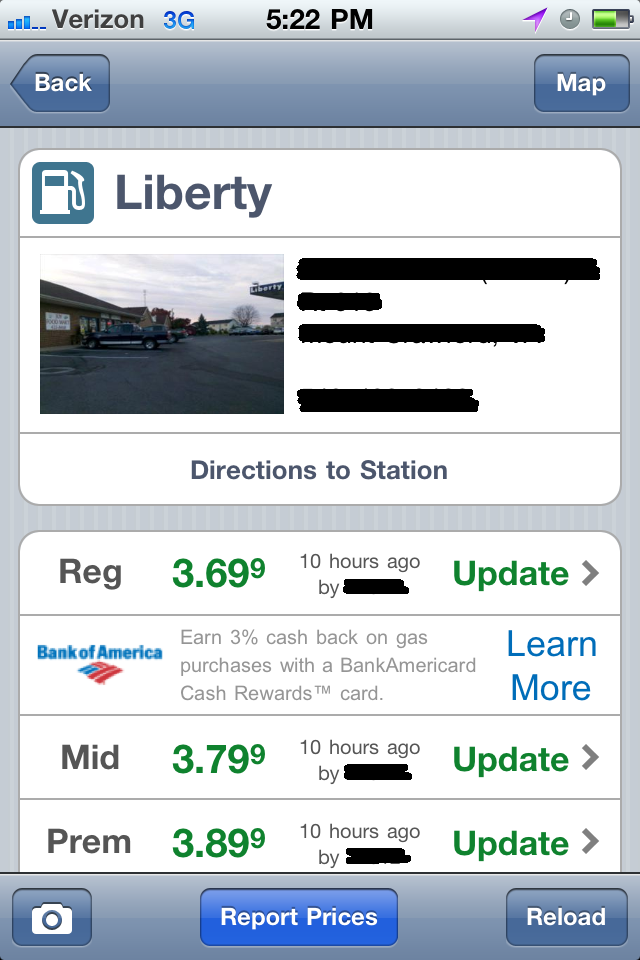
This is my newest app … and my husband’s newest obsession.  It uses your current location to search for gas stations near you.  It allows you to see the latest gas prices at that station.  You can have the app search for the closest station to you, or the cheapest station, so you can plan your trips accordingly.  You can even have it search for gas by the grade – so if your car needs premium gas, you can find the cheapest for that too.

How it works: super simple.  Press the big green gas tank on the front page.


Make sure you allow it to use your current location.  Then you will get a list of gas stations closest to you, with the price.

I blacked out those addresses and phone numbers :)

Click on the station that you are interested in, and you can see more details about the station.


You may notice in some of the pictures that the prices will say “updated 10 hours ago” or something similar to that.  How it actually works is, users can set up an account and update the prices as they see a change.  Now why in the world would you want to do that?  Because every time you update a gas price (I think they can only be updated twice a day per station) you earn points.  Points earn you tickets.  Tickets earn you a chance to win a $250 gas card, per week.  EVEN BETTER!

The catch – gas prices only get updated for each station if there are people in your area that are out there updating them on the app.  I’ve found in my area, quite a few people must have the app because just about every gas station has the accurate price.


EEBA  Cost of this app: FREE

EEBA – which I have no clue what it stands for – is like a virtual savings system.  It allows you to categorize where you want your money to go, and you can see where it goes each month.  A virtual budget, if you will.

This app allows you to create up to 10 envelopes.  You can label the envelopes whatever you wish, and add as much “money” as you wish to each envelope.  [My app is a work in progress; meaning I’ve just started to use this app, so my envelopes are unbalanced.  I’m just trying to give you a feel for the app.  I don’t want you to think I spent $200 on gas and only put 8 bucks into savings!]


I have envelopes listed as “groceries” and “gas” because I felt like those were two things we could somewhat control.  I didn’t put down envelopes like “internet” or “phone” because those bills are usually not negotiable.  Just my personal preference.  Every time I make a purchase within that envelope, I enter the date, the store, and how much I paid.  The app will tally up how much I have spent in each category and how much money I have left in each envelope.


The app also prorates each envelope based on the number of days in the month.  It will tell you if you are so many days “ahead” on the month [whoohoo you’re saving money and ahead of budget!!] or it will tell you how many days “behind” you are on the month [and suggests you stop spending for x number of days to catch up with your budget]. 

Bonus about this app: hubs, who also has an iPhone, can download this app and sign up under the same account as me.  So every time he makes a purchase, he can type it in, so we’re definitely bound to stay on the same page.

It can sometimes be a pain to remember to type in every entry, but if you can get in the habit of doing it as soon as you make the purchase, you’ll be on track to helping you budget where every cent goes.

If you’re not so good about typing in every entry as soon as you make the purchase, you might find the next app helpful…


Lemon  Cost of this app: FREE

This app is simple.  And I got it because I liked the concept, thought I would use it, and it was free.  The only problem is, I haven’t used it.  But that’s only because I stayed on top of entering everything as I went.  I guarantee you this will NOT continue in the future (I’m bound to slack once baby gets here!!) and I will use this.

Concept of the app: Scan your receipts.


This app will also let you see how much you have spent at a certain store just by scanning your receipt, but the EEBA app seemed to fit me better in this area.

Another reason it can be convenient to scan your receipts to your phone and save for later is if you want to reference back to them when using the next app.


Frugal  Cost of this app: $1.99 (well worth it!!)

I have been looking for something like this my entire life.  I’m not even joking.  So many times when I grocery store hop I’ve wondered “well Walmart has it for this price… but isn’t it cheaper at Giant?” but I couldn’t quite remember.  I even started carrying a small notebook in my purse to write down the price of certain items I used frequently so that I could compare the prices among my local stores.  The only problem was, not only was this sometimes difficult, but it was annoying when I wanted to compare the normal size to the bulk size (say at Costco).

Enter Frugal.  Ahhhhhhhhhhhh. Thank you!!!

Frugal allows you to compare prices of whatever item you want, between stores.  There are a few catches, but I don’t mind.

Catch #1 – it does not have preloaded prices.  So many people find this irritating.  But the grocery stores in my area are different than the ones in your area.  Grocery prices fluctuate across the country, not to mention very frequently.  And finally, what I frequently buy at the store may be something you never buy – so why clutter up your phone with information you don’t need.

Catch #2 – you have to enter every single thing yourself.  Yes, it sucks.  But again, in the long run, it’s very convenient to know you have the prices for what you want at the stores you want.  And if you don’t have time to visit your favorite stores and enter the prices of all those items, simply buy your weekly groceries at the store and copy the prices from your receipt.  [that’s how that Lemon app might be beneficial to you.]


So enter the item you want to compare at the top.  Then you can enter the store name and how much it costs at that store.  Again, this is a very new app to me, and I understand it’s a work in progress.  So for many of the items, I only have one store entered.  Another bonus about this is it allows you to add all sorts of quantities – which makes it super easy to compare regular size items to bulk items.  Once the prices are entered, it makes it easy to compare stores and see which store has the cheapest price.


Never again will you wonder, “can I get this cheaper across town?”  Also, not digging the idea of buying the items and copying the prices from the receipt?  I think hanging out in a grocery store with my phone for an hour or two on a 100 degree summer day sounds like an easy (and CHEAP) way to cool down.  But maybe that’s just me.


RL Classic  Cost of this app: FREE

Similar concept to the last app, this app allows you to compare prices by simply scanning the barcode.  I use this app a lot when I’m shopping for bigger items that I don’t need right this second.  [I don’t use it for groceries, because a lot of the time I can find a better deal online … and I don’t want to wait for shipping when it comes to grocery-like items].

This app is so easy to use and very hassle-free.  Simply find the barcode on the item you want to purchase and allow the bar code scanner (which uses the camera on your phone) to scan the barcode.


Once the app recognizes the product, it will scan the internet to find places to purchase the item and how much it costs.  It will even include places like eBay if you wish.


So simple!!  I can’t tell you how many times I’ve seen something in a store (especially books) scanned it, and realized I can get a better deal online.  Not only do I save money by purchasing the product somewhere else, but I’ve also cut down on impulse buying.  So many times I’ll scan an item, see a better deal, think to myself “I’ll order that when I get home” and then never get around to ordering it … because frankly, I don’t need it.

There’s only one downfall to this app.  A LOT of stores hate for you to use it.  Duuuuuhhhh!!  It takes business away from them!  Some stores even put their own barcodes on the item – overtop of the real barcode.  If that’s the case, this app won’t be able to recognize the item by simply scanning the store barcode.  It needs to actually scan the universal barcode (like pictured above).  I’ll confess.  I’ve been known to pull back those store stickers and scan the real one.  Or if that can’t be done, I’ll search through every single item on the shelf in hopes of finding one that has the sticker misplaced and leaves the real barcode exposed.  0:)

I’m sure there are 1000s of other money saving apps out there.  But these are the few I’ve discovered, and loooo-ve.  Drop me a comment if you use these or have found others helpful.  Happy saving!! 

Wednesday, February 22, 2012

couponing newbie


A few days ago, I decided I’d try my luck at “civilized couponing.”  It’s what we bloggers like to call the saner version of “extreme couponing.”  Not that there’s anything wrong with clearing out shelves and paying zero to very little for it, but it’s just not my style.  Juggling coupons and deals can be very overwhelming (as it was to me) and I have limited kitchen space as it is.  So, with the lead of Little Bit Funky and a few others, I decided to try my hand at buying what I needed or regularly use at a much cheaper price.

So, Monday, with the help of my hubs, I ventured out on my very first couponing trip.  Like I said, I was very overwhelmed at the thought, but who doesn’t like saving money??  I spent an hour that morning looking through deals on the internet and printing coupons.  I spent about an hour and a half and went to four different stores.  I paid $23.28 for all of this:

It's really like I bought that shirt and got the rest FREE ;)

How did I do it?  I’ll tell you, of course!

First stop was Staples.  They had those reams of copy paper on their “easy rebate” list.  Meaning, you have to pay for them in the store, but they give you a rebate form and you get fully reimbursed for them.  And when they say easy, they actually mean it.  All I had to do was fill out a simple form online (seriously took less than 2 minutes) with the rebate information printed on the receipt and my address.  You can even choose how you want it rebated – a rebate check mailed to you, or directly deposited into your PayPal account.  Total price: FREE!  Sweet!  Word of advice for this though: when you hear about easy rebate sales going on at Staples, go as quickly as you can.  I went on the last possible day, and a few of the other items they had on the rebate for free were sold out.  And there’s no rain check for that.  Sorry, folks.

Next stop was Michael’s.  I’m not a huge fan of this store.  Ok, let’s be frank.  I can’t stand this store.  But there aren’t many craft stores around this area.  So a few months ago, when we moved in to our new place, I purchased a few white photo boxes, at what I thought, was a good deal.  I eventually wanted to see my entire craft closet filled with those boxes, but that’s kind of expensive. 

Each box is regularly $3.99.  If you sign up for Michael’s emails (which I did a long, long time ago) not only will they email you the circular with the sale items, but they will also send you coupons for that week.  This week’s circular showed that my beloved photo boxes were on sale 6 for $10.  That’s just $1.67 each.  Whoa!  THEN one of the coupons they sent was 20% off the entire purchase – including sale items.  That brought the price down to $1.33 each.  So I loaded up by cart with 6 of those puppies and paid a whopping $8.37 for everything (that’s like four FREE photo boxes, people!!)  My closet never looked better:

ok, ok.  it's still very much a work in progress.  BUT!  it's the first time I've ever had a place for my craft tools, so I'm stoked!!  I hope to spruce it up eventually :)

The third store was Target.  Target is an awesome place, no?  Rule of thumb at Target that I learned thanks to the incredible folks at Hip2save.com – hand the cashier the manufacturer coupons first, then hand them the store coupons.  You’re allowed to combine coupons there, but apparently this is the way to do it.  I’m not sure why.  And I didn’t argue.  I just did as told.

I had a $3 off one maternity item store coupon, so when I found that shirt on clearance for $3.60, I nearly died.  Do you have any idea how expensive maternity clothes are!?  And I got one for 60 cents!???   I’m still in awe.

I headed to the personal care items isle next and landed my husband’s favorite body wash for $1 off, and a pack of cotton balls for $0.50 off.  Both of which we needed.

Then I went to the food section.  Our local Target is currently undergoing renovation on their 
grocery section, so a lot of the coupons I had (both store coupons and manufacturer coupons) couldn’t be used, simply because the stock was limited.  For instance, I really wanted to buy yogurt there, since I had two coupons for it, but they didn’t have any.  :(

I had a store coupon for Welch’s grape jelly.  When I started searching through the jellies, I found one bottle (ONE bottle) that had one of those manufacturer stickers on it that said “save $0.75 now!” and I did, by combining it with the Target coupon I already had.  SCORE!  Then, I had a coupon for a $1 off two Ortega products, so I chose the taco seasoning, making each packet only 19 cents each.  Hello!

Total Target bill for a maternity shirt, body wash, cotton balls, grape jelly, and 2 packs of taco seasoning: $4.87.  The cashier didn’t even blink an eye.  I, however, started getting butterflies and feeling a little bit giddy.

Last stop, Food Lion – a grocery chain here in the South.  I had a manufacturer coupon for Totino’s pizzas, which I happened to know were on sale at Food Lion.  Typically $1.79 each, they were on sale for $1 a piece.  Pair that with my buy five get a dollar off coupon, and it was a pretty sweet deal.  I also bought all those yogurts with a coupon.  One thing the cashier did, that she probably shouldn’t have done but I thanked her for a lot anyway – I had a manufacturer coupon for 50 cents off 8 YoPlait yogurts.  That yogurt pack I had in my cart technically has 8 yogurts in it.  But the pack is already at a discounted price.  I don’t think YoPlait meant for those coupons to count towards the 8-packs.  But technically there are 8 in there, and the coupon never said you couldn’t so I tried it.  When the coupon wouldn’t scan, the cashier agreed with me and chose to override it.  **Note, if you’re ever in doubt, don’t be afraid to speak up.  The coupon never said it wouldn’t count, and the cashier agreed that I was purchasing 8 yogurts, so she gave me the discount anyway.  I’m sure my nice attitude (and cute baby bump) didn’t hurt.  Cashiers easily get annoyed when you hand them a stack of coupons.  Be nice!!  It can go a long way!  Total FL bill: $10.04.  I don’t think I ever come out of that store paying so little!

So there you have it.  That’s how I did it.  2 ½ hours invested (that includes shopping time, and believe me, I took my time and browsed at each store).  What should have cost me over $75, really cost me $23.28.  And I didn’t purchase one single thing that I can’t use.  And I’m not hoarding twenty bottles of mustard in my basement either.  Success!!

So where did I find the deals?  I’d like to say I’m super on top of things and very conscious about store deals / where every single dollar goes, but… that’s a lie.  *sigh*  I already told you that I took the lead of Little Bit Funky.  She recommended a site (again, I already mentioned) Hip2Save.com – which posts an unbelievable amount of deals each day.  I got the Target coupons at coupons.target.com and the manufacturer coupons at couponnetwork.com.  I got the Taco coupon on the Ortega website.

Any other questions – don’t hesitate to leave a comment and ask.  I definitely don’t mind!  I don’t know how often I’ll be doing this couponing thing, but even if I do it once a week, or once a month, saving money on things we use … well I can’t go wrong there!

And now I’m off to celebrate my birthday!  :)  …which was yesterday.  But after taking my first glucose test at the baby doctor, I had all the sugar I needed.  The thought of birthday cake was not appealing after that.  But a very long nap was.  ;)


Ps – my apologies for the poor picture quality.  iPhone it was!